Braille Box

Engraved line drawing of Braille Box R3 (full CAD assembly). Moving the pointer over the drawing, or the Show in colour button, reveals the true-colour model. While the braille input is focused, the drawing looks down on the 48-pin reading surface and raises the pins of each embossed cell.
The idea & the why
An offline communication terminal designed around speech, six-key braille input, a refreshable tactile reading surface and a staff-facing display.
The problem
A conversation shouldn’t depend on both people using the same interface. A braille reader and a member of staff using a screen need a shared way to talk.
Who it’s for
Braille users and the staff who serve them, brought together by one offline terminal with tactile input, speech and a staff-facing screen.
The thinking behind it
Six Perkins-style keys handle braille input and a 48-pin surface presents tactile output. The R3 design fits both mechanisms into one enclosure, with room for the electronics and audio.
The result
An accessible bridge between tactile, spoken and visual communication, designed for public-facing services.
Disciplines
How it’s built
Every part below is read from the model file. Pick a group to pull its parts out of the assembly.
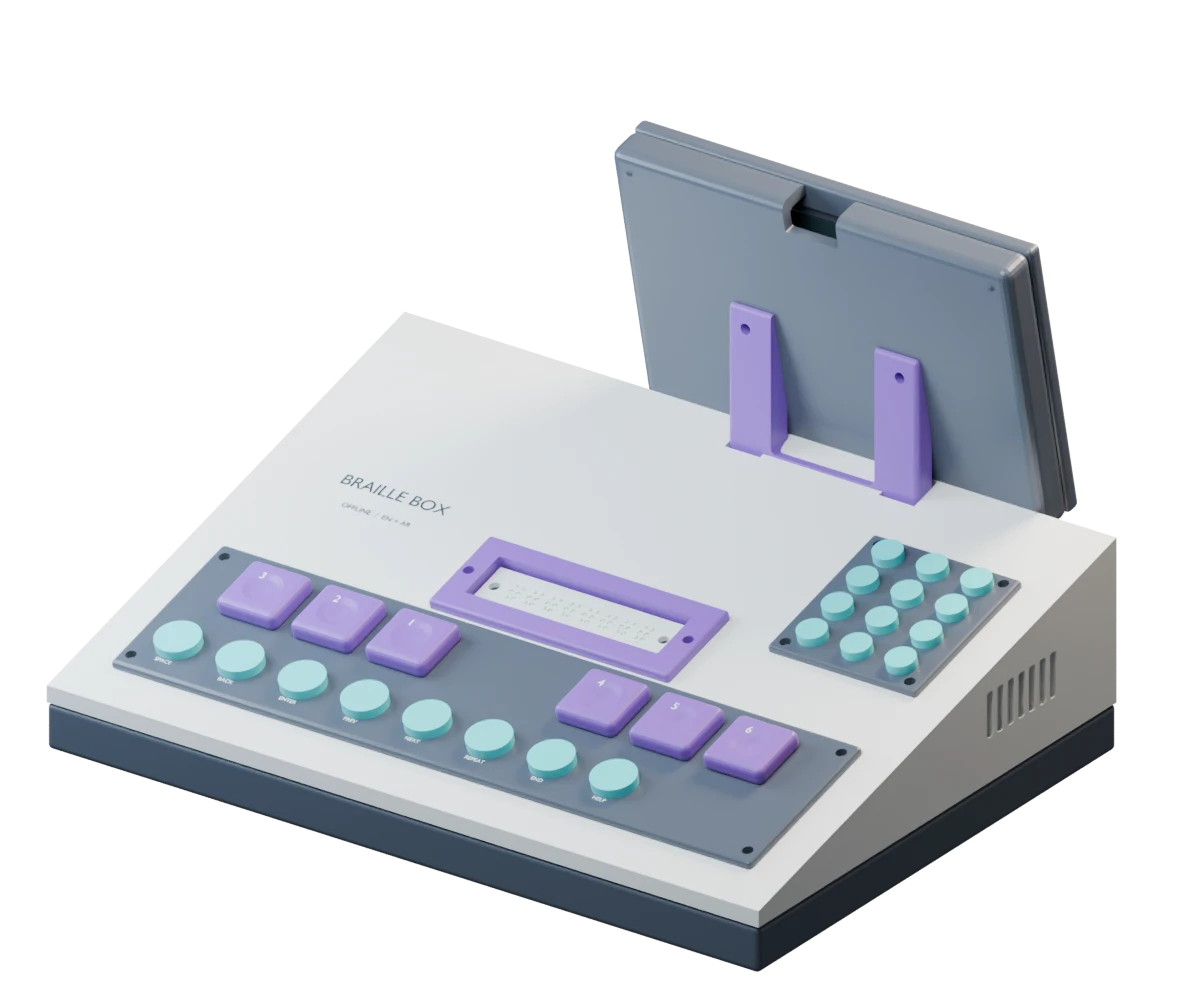
Engraved line drawing of Braille Box R3, its parts grouped for inspection. Moving the pointer over the drawing, or the Show in colour button, reveals the true-colour model.
141 parts in the model
48 parts in Tactile pins
- M03Tactile pin
- Pin times 47
3 parts in Reading surface
- I06Braille bezel
- M01Reading plate
- M02Pin guide
2 parts in Cam & research cartridge
- M04Research cartridge
- M05Eccentric cam
12 parts in Braille keys
- I02Primary keycap
- Label times 6
- Primary key times 5
19 parts in Input panel
- I01Key panel
- I03Aux keycap
- I04Phrase panel
- I05Phrase keycap
- Label “SPACE”
- Label “BACK”
- Label “ENTER”
- Label “PREV”
- Label “NEXT”
- Label “REPEAT”
- Label “END”
- Label “HELP”
- Aux control times 7
8 parts in Staff display
- I07Display bezel
- I08Display back
- I09Display stand
- Proxy LCD active
- Label “BRAILLE BOX”
- Label “Confirm before sending”
- Label “How can I help you?”
- Label “CONFIRM REPEAT”
2 parts in Audio grilles
- I10Speaker grille
- I11Mic grille
8 parts in Shell & base
- E01Base tray
- E02Wedge hood
- E04TPU foot
- Label “BRAILLE BOX”
- Label “OFFLINE / EN + AR”
- Foot times 3
26 parts in Supports
- E03Power strain relief
- E05Vent baffle L
- E05Vent baffle R
- E06Pi tray
- E07Controller rail
- E08Cable clip
- M3 base fastener times 4
- Proxy ballast
- Phrase times 11
- Controller rail rear
- Cable clip times 3
13 parts in Electronics bay
- Proxy Pi5 85×56
- Proxy cooler
- Proxy USB HDMI times 2
- Proxy driver board RESERVED
- Proxy Hbridge times 7
- Proxy speaker
Gallery
What we built
- 1. CONCEPTThe idea, modelled in 3D and ready to develop.
- 2. DESIGN — This projectEngineered in CAD, part by part, ready to make.
- 3. HARDWAREParts made and assembled into a physical build.
- 4. PROTOTYPEBuilt, wired and running on the bench.
- What we built
- The R3 mechanical design in 141 parts: the housing, Perkins-style keys, a 48-pin reading surface and the display mechanism.
Next project4 of 7
Himaya
BatLabs · Robotics, engineering and learning.